Tag: google notebook lm

  • Top 5 Use Cases for Podcas.io so far

    Top 5 Use Cases for Podcas.io so far

    Since we launched the generative AI podcast tool podcas.io, we have seen our users use the tool in many creative ways. We appreciate each user for using our tool, and we noticed some trends on what people were creating AI podcasts for. Here are the top five use cases of podcas.io so far!

    1. Turning recipes into step-by-step instructions

    This has suprised us as one of the most popular use cases of podcas so far. The podcast turns your favorite receipe into a short step-by-step instructional that you can follow along while you cook or bake. It also makes some of the more complex recipes so much simpler and makes sure you do not miss on the important details.

    2. Turning news articles into podcasts

    The 6 and 7am users of podcas.io like to start their day with an update on the latest news, and news article into a podcast allows them to listen to the news while they prepare their morning coffee. It helps them compress a newspaper section into a 5-minute podcast, with all the juicy tidbits from the article. Some use it for general news, while others use it for industry-specific media. Either way, turning news articles into a podcast works for many people!

    3. Corporate training videos

    Corporate training videos can be fun! With podcas.io, our corporate customers turn their training videos into a podcast. With up to four personas in each podcast, the conversation-style dialogue makes it more interesting for the listener. The trainee tends to be more engaged and would retain information better.

    4. Digest technical information fast

    Podcas.io can also turn complicated, technical information into easy to understand bite-size conversation pieces. We have noticed many users using the podcast to understand a company and their technical products. The ‘About Us’ page of a website tends to be a popular choice. We are guessing that this helps them to prepare for a meeting or to find out more about their competitor. Whichever it is, podcas.io is happy that we are here to help!

    5. Studying

    Podcas.io is also a useful tool for education. Found a website that would explain to you a complicated math equation, or a long wikipedia page on the cold war for your history exam? We turn these web pages into a podcast, and podcas.io works better than Google Notebook LM for students because we allow students to download the audio files, to listen on the go on any devices. They can also generate a podcast simply with content they find online, instead of having to upload a document.

    Which is the reason you are using podcas.io? Let us know and tell us how we can improve!

  • How to Create Your Podcast on Podcas.io

    How to Create Your Podcast on Podcas.io

    Creating your first podcast has never been easier! With Podcas.io, you can generate and share professional-quality podcasts in just a few steps. Follow this guide to get started today.


    Step 1: Create an Account

    Start by visiting Podcas.io and selecting the Sign In button. If you’re new, click on Sign Up to create your account. You can sign up using your Google account, making the process super simple.

    Best of all, no credit card information is required upfront. Once signed up, you’ll automatically get access to 5,000 characters per month and three unique voice options—all for free!


    Step 2: Craft Your Podcast Topic

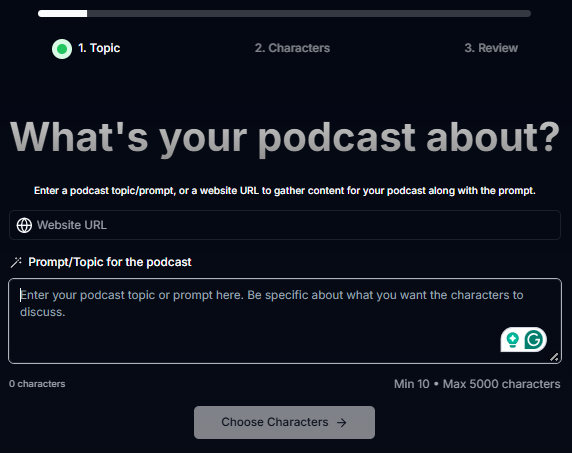
    After logging in, click on Create a Podcast to begin.

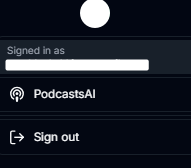
    Click on PodcastsAI in your profile, then clikc on a Create a Podcast.

    You’ll be asked to provide the following details:

    1. What’s your podcast about? – Describe the main theme or purpose of your podcast.
    2. Website URL – Add a link for additional supporting information or use this to transform an existing article into a podcast.
    3. Prompt/Topic for the podcast – Include specific points or comments to guide the content creation. Provide as many details as possible to get an accurate podcast. Things you can include:
      • Tone of voice
      • Who the characters are
      • Topic of discussion
      • Context to the link shared

    This step helps you structure your podcast and ensures it aligns with your vision.


    Step 3: Decide Your Podcast Hosts

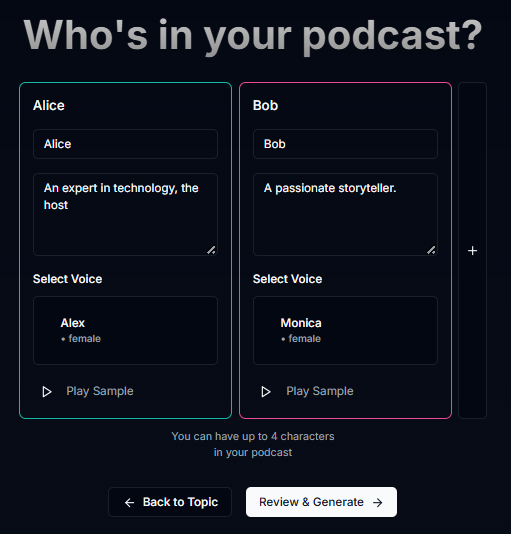
    Next, select the hosts for your podcast. Choose a voice and persona to bring your content to life. Free users can pick from three distinct voices, while Starter and Pro users can access a library of over 1,000 voices. Whether you want a conversational, humorous, or formal tone, Podcas.io has options to fit your style.

    Then give them a persona. What are their names? Are they regular podcast hosts? Are they guests who are specialists in a specific industry?


    Step 4: Click Generate

    Once everything is set, click Review & Generate and let Podcas.io do the magic. Within moments, your podcast will be ready for review.


    Step 5: Refine and Share

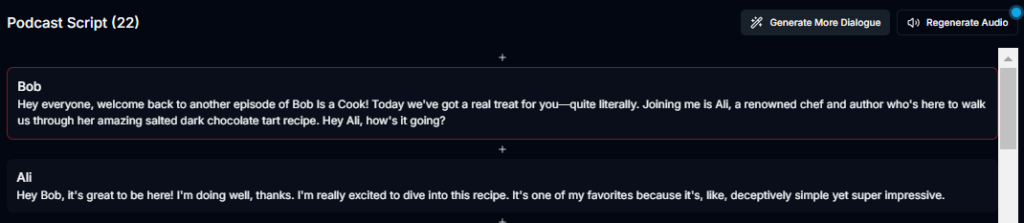
    If you want to enhance your podcast, you can edit the script directly within the platform. You can also request for more dialogue to be added. Then regenerate the improved version!

    Once satisfied, it’s time to share it with the world!

    Podcas.io automatically generates a professional thumbnail and video format for your podcast. You can download and share your podcast in audio or video formats. Embed options are also available, making it easy to post on your website or social media platforms.


    Start Your Podcast Journey Today

    With Podcas.io, creating a podcast is as simple as these five steps. Whether you’re starting a passion project or building a brand, Podcas.io provides the tools you need to succeed. Try it now and bring your podcast ideas to life!

    Dang.ai

  • The Future of Podcasts: Google Notebook LM vs. Podcas.io

    The Future of Podcasts: Google Notebook LM vs. Podcas.io

    The future of podcasts is now. Content creation has never been easier, and recent innovations like Google Notebook LM and Podcas.io have made podcast episode creation faster, smarter, and more customisable than ever. These tools are reshaping the way we create and consume audio content, catering to both personal and professional needs. But when it comes down to Google Notebook LM vs. Podcas.io, which one should you choose?

    After testing both, it’s clear that while Google Notebook LM excels in academic-focused content, Podcas offers a broader and more entertainment-driven experience. Below, we’ll compare these two solutions head-to-head so you can decide which is right for you.


    Source Input: File Upload (Google Notebook LM) vs. Web Links (Podcas)

    Google Notebook LM relies heavily on user-uploaded files as the source material for its audio overviews. Users can upload PDFs, documents, and other files to generate concise summaries in audio format. This makes it perfect for academics, students, and researchers who need audio summaries of dense material.

    Podcas, on the other hand, pulls information directly from web links. Users simply paste a URL, and Podcas combines this with additional open-source material to create a unique, dynamic podcast episode. This approach allows for broader content curation, offering users fresh, relevant, and up-to-date audio episodes on the fly.

    Verdict: If you want to convert existing academic materials into audio, Google Notebook LM is the clear winner. For content pulled from live, ever-evolving web pages, Podcas offers unmatched flexibility.


    Creation of Personas: None (Google Notebook LM) vs. Hundreds (Podcas)

    We all have our favourite TV characters—Ross from Friends, Jon Snow from Game of Thrones, and more. Podcas takes this idea to the next level, offering users the ability to select from hundreds of personas and character voices to narrate their podcasts. Want to hear your episode narrated by a wise mentor, a quirky friend, or a sci-fi robot? With Podcas, you can.

    On the flip side, Google Notebook LM sticks to a more traditional approach, using standard AI-generated voices designed for clarity and simplicity. While it’s efficient for academic overviews, it lacks the charm and personalisation offered by Podcas.

    Verdict: Podcas takes the crown here with its wide range of voice personas that create a richer, more engaging podcast experience.


    Focus: Academic (Google Notebook LM) vs. Entertainment and Information (Podcas)

    Google Notebook LM was built with an academic audience in mind. Its main selling point is its ability to condense thick, wordy academic material into bite-sized summaries. It’s a lifesaver for students, researchers, and lifelong learners who need a quick audio summary of a long textbook or a dense research paper.

    Podcas, on the other hand, is all about entertainment and user-driven information. It’s a casual platform designed for users who want to turn web content into a shareable podcast episode. Whether it’s a news article, a blog, or a “Top 10 Tips” list, Podcas transforms it into an engaging audio experience that’s fun, light, and interactive.

    Verdict: Google Notebook is best for academic use, while Podcas wins for casual entertainment and personal information needs.


    Download Options: Audio Only (Google Notebook LM) vs. Audio and Video (Podcas)

    Google Notebook LM’s audio overviews are designed for personal use, and while users can listen on the platform, they cannot download the audio files. This limits flexibility for users who might want to save content for offline listening.

    Podcas provides more freedom. Users can download their created episodes in both audio and video formats. This feature is especially useful for those who want to share training videos, tutorials, or “mini-shows” with friends, family, or colleagues. You’re not limited to personal use—you can distribute your creations on other platforms too.

    Verdict: Podcas wins hands down, offering users the ability to download and share their content in multiple formats.


    Table Comparison: Google Notebook vs. Podcas

    FeatureGoogle Notebook LMPodcas
    Source InputFile UploadsWeb Links + Open-Source Data
    PersonasNoneHundreds of Character Voices
    Content FocusAcademic SummariesEntertainment & Informative Podcasts
    Download OptionsAudio OnlyAudio + Video

    Which One Should You Choose?

    If you’re a student, academic, or researcher looking to convert dense academic content into quick audio summaries, Google Notebook LM is the better choice. It’s straightforward, efficient, and focused on educational value.

    But if you’re looking for something more dynamic, creative, and sharable, Podcas is the clear winner. Its ability to transform live web content into shareable podcast episodes, combined with its extensive selection of voice personas and download options, makes it the more versatile option for personal and professional use.

    Bottom Line: Choose Google Notebook LM if you’re focused on academic content, and pick Podcas if you want an entertaining, customisable podcast experience that’s ready to share with the world.

  • 7 Hacks to Find Your Perfect Podcast Niche

    7 Hacks to Find Your Perfect Podcast Niche

    Starting a podcast is exciting, but choosing the right topic is crucial for success. With countless podcasts available, it’s essential to find a podcast niche that resonates with your audience and stands out. Here are seven practical tips to help you pick the perfect podcast topic.

    1. Align Your Goals and Interests

    The best podcasts start with passion. Ask yourself why you want to create a podcast and what you hope to achieve. Are you sharing knowledge, building a community, or starting meaningful conversations?

    Choose a topic you genuinely enjoy and can talk about endlessly. For example, if you love cooking, consider starting a podcast about unique recipes or food history. When your enthusiasm shines through, it’s easier to keep your audience engaged.


    2. Understand Your Audience

    Your podcast isn’t just for you; it’s for your listeners. Take the time to research and define your target audience. Who are they? What are their interests and pain points?

    Get specific. Instead of targeting all fitness enthusiasts, focus on a niche like busy professionals who want 20-minute workouts. Use tools like Google Trends or social media to understand what your audience is searching for and tailor your content accordingly.


    3. Find Your Unique Angle

    Stand out by offering something different. Look at existing podcasts in your chosen category and identify gaps. How can you bring a fresh perspective or unique voice?

    For instance, if you’re interested in personal finance, you could focus on financial tips for young parents. Stress-test your idea by listening to similar podcasts and ensuring your take feels original and valuable.


    4. Consider Monetization Early

    Podcasts require time and resources, so think about how you’ll cover costs or make money. Popular monetization options include sponsorships, ads, and listener subscriptions.

    Match your monetization strategy to your audience. If your podcast targets entrepreneurs, sponsorships from business tools or services could be a great fit. Planning this early helps you create a podcast that’s not just engaging but also sustainable.


    5. Look into Industry Trends

    What are people talking about? Use tools like Google Trends or Keyword Planner to gauge interest in potential topics. Trending topics can provide inspiration, but ensure they’re broad enough to remain relevant over time.

    For example, if you’re considering a podcast about tech, focus on emerging technologies like AI, which will stay relevant longer than a podcast about a specific app or gadget.


    6. Choose Evergreen Content

    Trendy topics can be tempting but may not last. Evergreen content ensures your podcast stays relevant over time. Ask yourself if your chosen topic has enough depth to sustain multiple episodes.

    For instance, a podcast about a popular TV show might lose steam when the show ends. Instead, a podcast about storytelling techniques in TV and film could remain relevant for years. Ensure your topic allows room for growth and consistent content creation.


    7. Test Your Podcast Niche Ideas

    Before committing to a podcast topic, create a few trial episodes. These can help you identify potential challenges and gather feedback from friends, family, or even a small focus group. Testing also helps you refine your tone, format, and approach before launching publicly.

    Get started today with Podcas.io

    A great way to test out your podcast niche is to try it out and see how your audience reacts. With Podcas.io, turn interesting topic ideas into realistic podcasts. You can use the AI-generated podcasts from podcas.io as a sounding board. If it sounds good, then go and start recording!